
RomanRoman IME — Japanese input method for macOS (kana-kanji conversion) — latest 2.24
Roman (Roman IME) is a Japanese input method for macOS that brings an LLM (large language model) into kana-kanji conversion. Type romaji continuously and you get kanji-kana text that fits the context. Conversion, learning and inference all run on your own Mac.
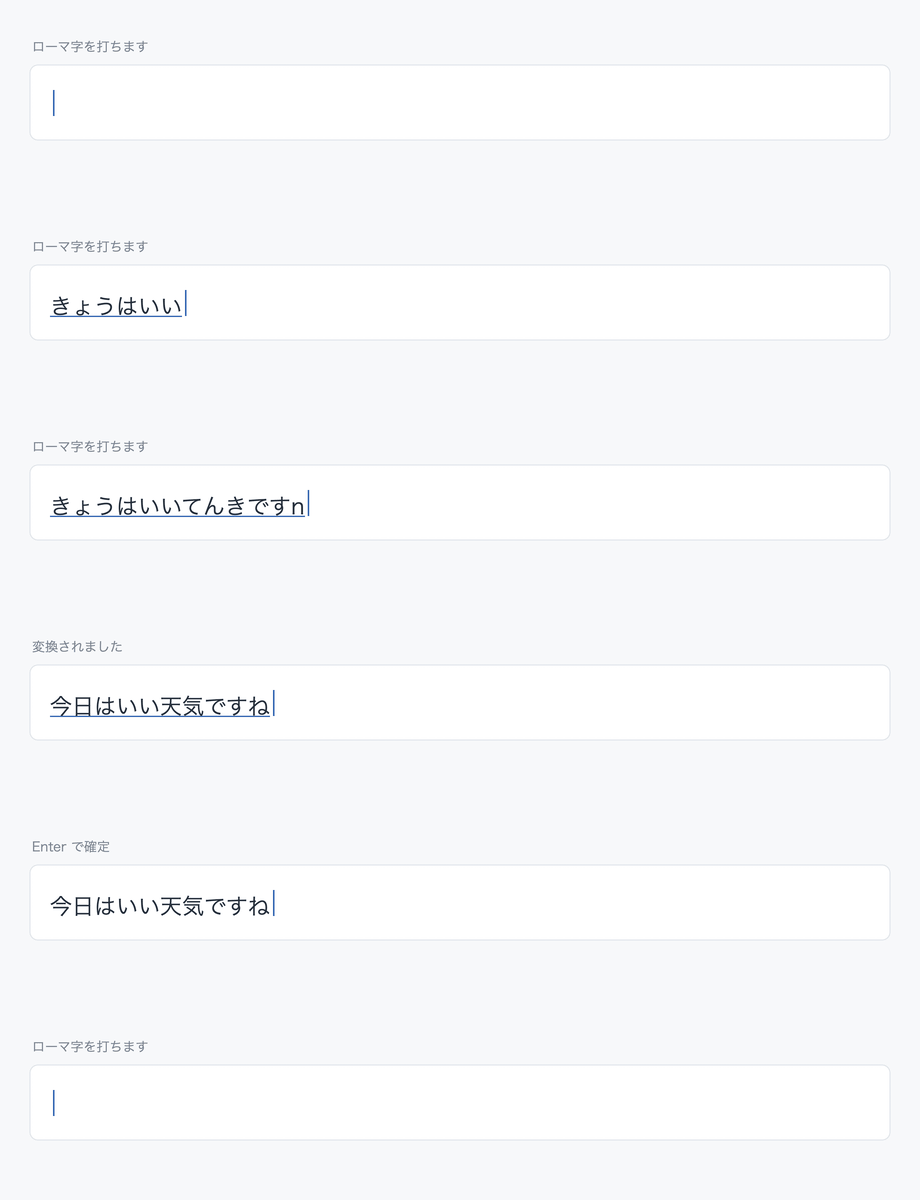
No conversion key
keystrokes  nihongonyuuryokuhakawaru
             │
             │  while typing
             ▼
kana        にほんごにゅうりょくはかわる
             │
             │  when typing pauses
             ▼
converted   日本語入力は変わる
Roman is a form of live conversion — it follows your typing without a conversion key — but it does not commit text as you type. Instead it uses the pauses between keystrokes as the moment to convert. Candidates come from dictionaries, are judged by AI, and are combined with what Roman has learned from you.
Five characteristics
- No conversion key Pause briefly and the text converts by itself; keep typing and it commits by itself. The space key is only for looking at other candidates.
- Stays out of your way The display does not jump around while you are typing or correcting, so you can keep writing.
- Reads the context AI uses the surrounding text to decide between homophones and wordings.
- Learns your hand The candidates you choose are learned automatically and preferred next time. Typing habits and mistakes are learned too, and used for correction.
- Entirely on your Mac Conversion, learning and AI inference are all local. What you type is never sent to the internet.
Conversion accuracy
Accuracy is measured on the public evaluation set AJIMEE-Bench (200 items built from the Japanese Wikipedia input-error dataset; 100 with a preceding sentence, 100 without). Acc@1 is how often the first candidate is already correct; CER is the character error rate.
| First candidate correct (Acc@1) | 80.5% (without context 83.0% / with context 78.0%) — for reference, macOS built-in Live Conversion: 64.5% |
|---|---|
| Character error rate (CER) | 2.57% — for reference, macOS built-in Live Conversion: 4.19% |
| Version measured | Roman 2.01 (measured 2026-08-23; 1.20 was Acc@1 80.5% / CER 2.38%, 1.17 was 73.5% / 4.85%) |
Method: each item goes through the same path as normal typing (dictionary, AI scoring, context-based re-selection), and the text that appears on screen is taken as the answer. For items with a preceding sentence, that sentence is passed as context. Any spelling the evaluation set accepts (okurigana or numeral variants) counts as correct. The figures are measured on the developer's Mac with its learned state; the conversion adapts further to your own vocabulary as you use it. The macOS Live Conversion figures are a reference measurement taken on the same Mac, on the same day, with the same 200 items typed automatically into a text field with Live Conversion on, scoring the committed text by the same criteria (the macOS side also had the user's learning history).
Bundled dictionaries
The vocabulary combines entries machine-extracted from published dictionary data with entries registered by hand after confirming actual misconversions. Every addition is verified against two rules — never invent a reading, never break the conversion of common words. See the README for sources and licenses.
| Base dictionary | About 130k readings of common words, 67k katakana readings and 8k verbs, derived from the mozc OSS dictionary (2.01 narrowed the katakana entries from about 190k by removing machine-generated compounds that no external lexical resource backs up) |
|---|---|
| Single kanji | 1,857 reading-character pairs covering the 2,136 jōyō kanji, from KANJIDIC2 (EDRDG) (added in 2.01) |
| Modern-vocabulary top-up | 4,391 pairs found in UniDic for Contemporary Written Japanese (NINJAL) but missing from the base dictionary, kept only when JMdict (EDRDG) confirms them as present-day spellings (added in 2.01) |
| Proper nouns | About 150k entries — personal names, place names, station names, organizations and companies, from JMnedict (EDRDG) |
| Disease and symptom names | About 21k entries from the MANBYO dictionary (NAIST), limited to entries in the standard disease-name master or confirmed by medical professionals |
| Drug ingredient names | 396 katakana ingredient names from MHLW publications |
| Listed company names | 884 companies from the FSA EDINET code list — only names that did not already rank high in conversion, selected by measurement |
| Shop and brand names | 51 names from a Wikidata-derived list of about 900 shop and company names — only those that were missing or ranked 5th or lower in conversion, selected by measurement (added in 2.15) |
| Legal terms | 3,404 entries from the SKK legal dictionary (SKK-JISYO.law, originally the LKKS dictionary by attorney Hiroshi Komatsu). Mechanical rules drop terms that already convert correctly by composition and terms that would displace ordinary spellings, keeping only those that become correct when added as a single word. The dictionary file itself is distributed under the GNU GPL v2 or later (added in 2.18) |
| Idioms, proverbs and four-character compounds | 2,562 entries from JMdict (EDRDG) |
| Emoticons (kaomoji) | 438 emoticons from mozc OSS data; type かおもじ to browse them all |
| Emoji | 1,914 emoji; which characters are included follows the Unicode list (Emoji 17.0) and the 4,561 readings come from mozc OSS data; type えもじ to browse them all (added in 2.07) |
| Colloquial sentence endings | Endings like っしょ, じゃねー, やで, ねん — only those with confirmed misconversions (original) |
| Computer terms and supplements | Words registered one by one after confirming actual misconversions (original) |
| Your own learning | Learned from what you commit; stored only on your Mac, never sent anywhere |
Requirements
| CPU | Apple Silicon Mac (AI runs locally; Intel Macs are not supported) Recommended: M4 or newer |
|---|---|
| Memory | 16 GB or more Recommended: 24 GB or more |
| Storage | About 8 GB free (0.4 GB for the app, 4.8 GB for models and runtimes, plus working space) |
| OS | macOS 14 or later |
Since 2.04 the AI that re-selects spellings from context (Qwen) is optional. It resides in memory and uses about 5.5 GB, so it is installed only on Macs with 24 GB or more. A Mac below that runs the same dictionary and BERT (a Japanese pre-trained transformer) conversion without it. On a Mac with 24 GB or more, if the resident memory is a concern, uncheck "Use the arbiter (Qwen)" in Roman Settings: the AI (Qwen) is no longer used, its resident process exits, and about 5.5 GB is freed. Check it again to start it right away.
Download
Get the latest release (GitHub)
Free for individuals (including sole proprietors and freelancers). Use by companies and other organizations requires a paid license — contact @mobazou via DM on X beforehand (see the terms of use). If you like Roman, you can support its development through GitHub Sponsors.
The package (pkg) is about 186 MB. On first install it downloads language models (the installer asks before downloading; expect 15–60 minutes depending on your connection). What is downloaded, and what it lets the conversion do, depends on how much memory your Mac has.
| Memory in your Mac | Download | What is installed | What conversion can do |
|---|---|---|---|
| Common | About 186 MB | Dictionary lattice and zenz (in the pkg) |
Builds candidates only from words that exist in the dictionaries |
| 16 GB (below 24 GB) |
About 2.0 GB | BERT | Scores each candidate in context and decides the ranking |
| 24 GB or more | About 4.8 GB | BERT + Qwen | All of the above, plus re-selecting among homophones the scoring could not separate |
Documentation is in Japanese: basic operations (with animations), installation guide and user manual.
Privacy
Conversion, learning and AI inference all happen on your Mac. What you type is never sent to the internet.
Roman uses the network in only two situations:
- Downloading the language models during installation, from their official distribution sites (once only)
- The monthly check for a new version, if you turn it on (off by default)
Feedback
Bug reports, conversion-quality reports and feature requests are welcome on GitHub. For a conversion problem, please include the keystrokes you typed and the text you expected.